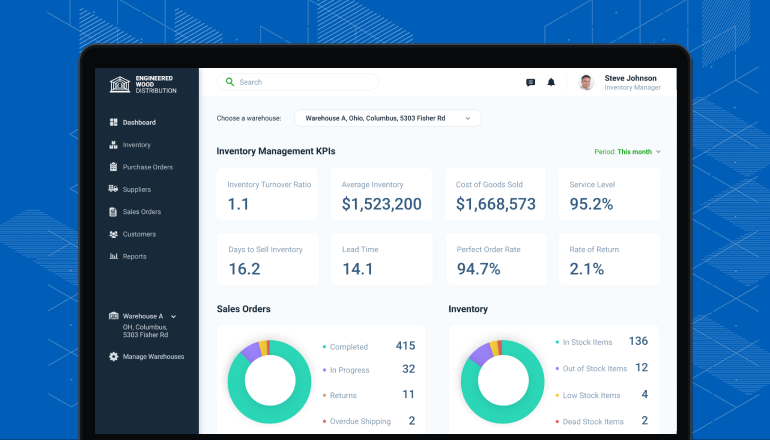
Managing your inventory well can make or break your small business. If you’ve ever felt overwhelmed by keeping track of stock, missed sales because of out-of-stock items, or wasted money on excess inventory, you’re not alone.
But what if you could simplify all that? Imagine having a system that helps you stay on top of your inventory effortlessly, so you can focus on growing your business. That’s where Bizmation comes in—the best ecommerce automation tool designed to make inventory tracking smooth and stress-free.
You’ll discover practical inventory tracking tips tailored for small businesses like yours, plus how Bizmation can transform your operations and boost your profits. Keep reading to unlock the secrets to smarter inventory management!
Forecasting demand is a crucial step for any small business trying to keep inventory just right. It helps you know how much stock to order so you don’t run out or overstock. Getting this balance right saves money, improves customer satisfaction, and keeps your operations smooth.
Look at your past sales data carefully. Identify which products sell quickly and which ones sit on your shelves. This helps you predict future demand more accurately.
For example, if you notice a spike in sales every holiday season, plan to stock up before that time. You don’t want to miss out on those busy weeks.
You don’t need complex software to start forecasting. Even a spreadsheet can track monthly sales and highlight trends. Over time, this gives you a clearer picture of what to expect.
Many small businesses miss out by ignoring these simple tools. Ask yourself: Are you using the data you already have to make smarter buying decisions?
Demand doesn’t stay the same forever. New competitors, changing customer tastes, or economic shifts can affect what sells. Keep an eye on these factors and adjust your forecasts accordingly.
When I first started, I didn’t account for a new competitor and ended up with excess stock. Since then, I check market trends monthly to avoid the same mistake.
Bizmation helps you automate demand forecasting by syncing real-time sales data from your online store. It alerts you when stock levels drop or when demand is rising. This means you can make faster, smarter inventory decisions without guesswork.
Think about how much time you could save if your system flagged hot-selling items instantly. Bizmation lets you focus on growing your business instead of worrying about stock.
The FIFO method stands for "First In, First Out." It means selling or using the oldest stock first. This method helps keep your inventory fresh and reduces waste. It is especially useful for small businesses with perishable or dated products.
Applying FIFO ensures that older items do not stay in storage too long. It also helps prevent losses from expired or outdated goods. Using FIFO improves inventory turnover and keeps your stock organized.
Arrange your products so the oldest items are easy to access. Store new stock behind or below the older stock. Label items with arrival dates to track their order. This setup makes picking products faster and reduces mistakes.
FIFO reduces the chance of selling expired goods. It helps maintain product quality for customers. This method improves financial accuracy by matching costs with sales. It also simplifies inventory audits and reporting.
Bizmation automates inventory updates and tracks product dates. It alerts you when items approach expiry or need selling first. The system helps maintain FIFO by organizing stock data clearly. It saves time and reduces manual errors in tracking.
Identifying slow movers is crucial for small businesses to keep inventory healthy. Slow movers are products that stay in stock too long without selling. These items tie up cash and take up valuable space.
Spotting slow movers early helps you reduce losses and improve cash flow. It also helps make room for products that customers want.
Check your sales data often to spot slow-moving items. Use reports to see which products sell less over time. Compare sales month to month for clear patterns.
Regular tracking avoids surprises and helps you act quickly.
Decide how long a product should stay in stock. For example, if an item does not sell in 90 days, consider it slow moving. Setting clear time limits helps you identify problem items fast.
Inventory software like Bizmation helps track product movement easily. It shows which items sell fast and which do not. Automated alerts can notify you about slow movers.
These tools save time and reduce errors in tracking.
Look for changes in customer preferences that affect product sales. Seasonal products often slow down after their peak time. Adjust your inventory based on these trends to avoid excess stock.
Offer discounts or bundles to clear out slow-moving items. Promotions help attract buyers and free up storage. Plan these sales early to avoid long-term inventory buildup.

Conducting regular audits is essential for accurate inventory tracking. Audits help find mistakes and prevent stock issues. They provide a clear view of what is available and what needs ordering. Regular checks reduce losses and improve cash flow. Small businesses can save money by avoiding overstock or shortages.
Audits build trust with customers by ensuring products are always available. They also improve decision-making by giving reliable data. Setting a routine for audits keeps inventory updated and accurate. Using Bizmation automation makes audits faster and easier.
Pick specific days for regular audits. Weekly or monthly checks work well for most small businesses. Consistency prevents missed errors and keeps data fresh. Plan audits during slow business hours to reduce disruptions. A fixed schedule helps staff prepare and stay focused.
Choose a simple counting method and stick to it. Count items one by one or use barcode scanners. Make sure all team members understand the process. Clear methods reduce mistakes and speed up audits. Bizmation supports barcode scanning to ease counting tasks.
Match counted items with your inventory records. Check for differences and investigate any gaps. Update your system to reflect the real stock. This keeps your data reliable and prevents ordering errors. Bizmation syncs your records automatically for easy comparison.
Train your team on audit procedures and importance. Teach them to handle products carefully and count accurately. Good training lowers human error and speeds up audits. Staff who understand audits help maintain strong inventory control.
Record findings after each audit. Note discrepancies and actions taken to fix them. Documentation helps track trends and recurring issues. Use reports to improve future audits and inventory management. Bizmation provides detailed audit reports for better tracking.
Using cloud software transforms inventory tracking for small businesses. It keeps data safe and accessible from anywhere. Cloud tools update stock levels in real time. This helps avoid overselling or running out of products.
Cloud software also reduces manual errors. It automates many tasks like ordering and reporting. Business owners get a clear view of inventory trends. This supports smarter buying and sales decisions.
Cloud software saves time by automating routine tasks. It offers instant updates across all sales channels. Small businesses can track stock on mobile devices. This flexibility improves control and speeds up responses.
Reports generated by cloud tools show what sells best. They highlight slow-moving items to reduce waste. Cloud systems often integrate with accounting and shipping apps. This creates a smooth workflow for e-commerce operations.
Pick software that fits your business size and needs. Look for easy-to-use interfaces with clear dashboards. Check if it supports multiple sales platforms like online stores and physical shops. Make sure it offers good customer support.
Consider software with automatic alerts for low stock. Integration with e-commerce automation tools like Bizmation adds value. Bizmation helps sync orders, track inventory, and manage shipments. This reduces manual work and errors.
Keep your product information up to date in the system. Regularly audit physical stock to match cloud records. Train your staff on using cloud software properly. Use cloud reports to plan restocking and promotions.
Set reorder points to avoid stockouts. Use barcode scanning to speed up inventory checks. Monitor stock movement daily for accurate forecasting. Cloud software makes these tasks easier and more reliable.
Tracking stock levels is vital for small businesses to manage inventory well. It helps avoid running out of products or overstocking. Keeping accurate stock counts ensures smooth operations and better customer satisfaction.
Using a reliable system to track inventory saves time and reduces errors. Automated tools like Bizmation can simplify this process. They update stock levels in real-time, making it easier to keep control.
Update stock data as sales and deliveries happen. Real-time tracking prevents mistakes and keeps stock counts accurate. It also helps spot trends and plan restocking better.
Define minimum stock amounts for each product. When levels drop below this, reorder alerts trigger. This step avoids running out and keeps products available to customers.
Barcode scanners speed up stock checks and reduce manual errors. Scanning items during sales and restocking ensures precise inventory records. It saves time and improves accuracy.
Perform regular physical counts to verify system data. Audits catch discrepancies and help correct mistakes quickly. This keeps inventory data trustworthy and up to date.
Tools like Bizmation automate tracking and syncing across sales channels. Automation reduces manual work and human errors. It also provides insights to optimize stock management.
Automating inventory alerts helps small businesses avoid stock problems and lost sales. It saves time by notifying owners about low stock levels instantly. This system improves accuracy by reducing human errors in manual tracking.
Using automation, businesses can set alert thresholds based on sales trends. This ensures timely restocking and keeps customers satisfied. Automation also helps with managing multiple sales channels from one platform.
Inventory alerts notify when product quantities fall below a set point. This prevents running out of popular items. Alerts also help identify slow-moving stock that may need discounts or promotions.
Automated alerts reduce the need for constant manual checks. They allow quick responses to supply chain delays. This keeps inventory balanced and reduces storage costs.
Choose a clear minimum stock level for each product. Base this on sales data and supplier lead times. Set alerts to trigger before reaching that point to allow reorder time.
Use different alert levels for fast and slow sellers. Customize notifications to reach the right team members. Include details such as item name, quantity left, and reorder suggestions.
Bizmation automates inventory alerts across online stores effortlessly. It syncs stock data in real-time and sends instant notifications. This helps small businesses maintain control without extra work.
Bizmation integrates with multiple ecommerce platforms and suppliers. It tracks stock changes from sales and returns automatically. Alerts come through email or app messages, ensuring nothing is missed.
Choosing the right tools for inventory tracking can save time and reduce errors. Small businesses need solutions that fit their size and budget. The right software helps manage stock levels, orders, and sales easily. Automation simplifies daily tasks and improves accuracy.
Many tools offer cloud access, allowing you to check inventory anytime. Integration with sales channels keeps data updated. Picking tools with user-friendly interfaces helps your team adopt them quickly. Consider features like barcode scanning and real-time alerts. These features keep stock data current and prevent overselling.
Start by listing your inventory challenges. Do you sell in multiple places? Do you need mobile access? Know if you want features like order management or supplier tracking. Clear needs guide you to the best tools. Avoid paying for features you won’t use.
Choose tools that connect with your sales platforms. Syncing your online store and point of sale saves time. Integration reduces manual entry and errors. It also helps track inventory across all channels. Check if the tool works with popular platforms like Shopify or WooCommerce.
Automation speeds up repetitive tasks like reordering stock. Tools like Bizmation handle ecommerce automation smoothly. They update inventory automatically after each sale. Automation lowers the risk of stockouts or overstocking. Look for tools with alerts for low stock and sales trends.
Your business will grow. Pick tools that grow with you. Scalable software handles more products and orders easily. Also, consider customer support quality. Good support helps solve issues fast. Training resources and tutorials are helpful for your team.
Streamlining order processes is essential for small businesses to save time and reduce errors. Efficient order handling improves customer satisfaction and keeps inventory accurate. Automation tools like Bizmation help simplify tasks and speed up workflow.
Clear steps for managing orders prevent confusion and delays. Tracking orders from placement to delivery ensures smooth operations. This focus lets small businesses grow without getting overwhelmed by order chaos.
Manual order entry takes time and causes mistakes. Automating this step speeds up the process. Bizmation connects your sales channels directly to your inventory system. Orders update automatically, reducing errors and saving hours.
Handling orders from multiple platforms can be tricky. A centralized system gathers all orders in one place. This setup makes it easy to track and manage every order. Bizmation offers a unified dashboard that shows all orders instantly.
Shipping errors cause unhappy customers and extra costs. Integrating inventory with shipping tools avoids stockouts and wrong shipments. Bizmation syncs inventory levels with shipping carriers to keep everything aligned. This integration ensures fast and accurate deliveries.
Track small business inventory by using cloud-based software, regularly auditing stock, applying FIFO method, forecasting demand, and monitoring stock levels constantly.
Bizmation is a top inventory control tool for e-commerce businesses. It automates tracking, syncs sales channels, and prevents stock errors efficiently.
The best inventory tracking programs include Zoho Inventory for multi-channel sales, Ordoro for e-commerce, and inFlow Inventory for detailed tracking. Choose based on your business size, sales channels, and needed integrations. These tools offer real-time tracking, automation, and ease of use.
Best practices for small business inventory management include accurate forecasting, using FIFO method, regular stock audits, tracking stock levels continuously, and using cloud-based inventory software. Streamline ordering and maintain vendor audits to prevent stock errors and ensure smooth operations.
Effective inventory tracking keeps your small business organized and ready. Use simple methods to monitor stock regularly. Choose tools like Bizmation for easy ecommerce automation. It helps save time and reduces errors in your process. Consistent tracking prevents lost sales and overstock problems.
Keep learning and adjusting your system as your business grows. Clear inventory insight supports smarter decisions every day. Start small, stay focused, and watch your business run smoothly.